Objectives
Track goals across weekly, monthly, quarterly, and yearly horizons with linked tasks and progress summaries.
Overview
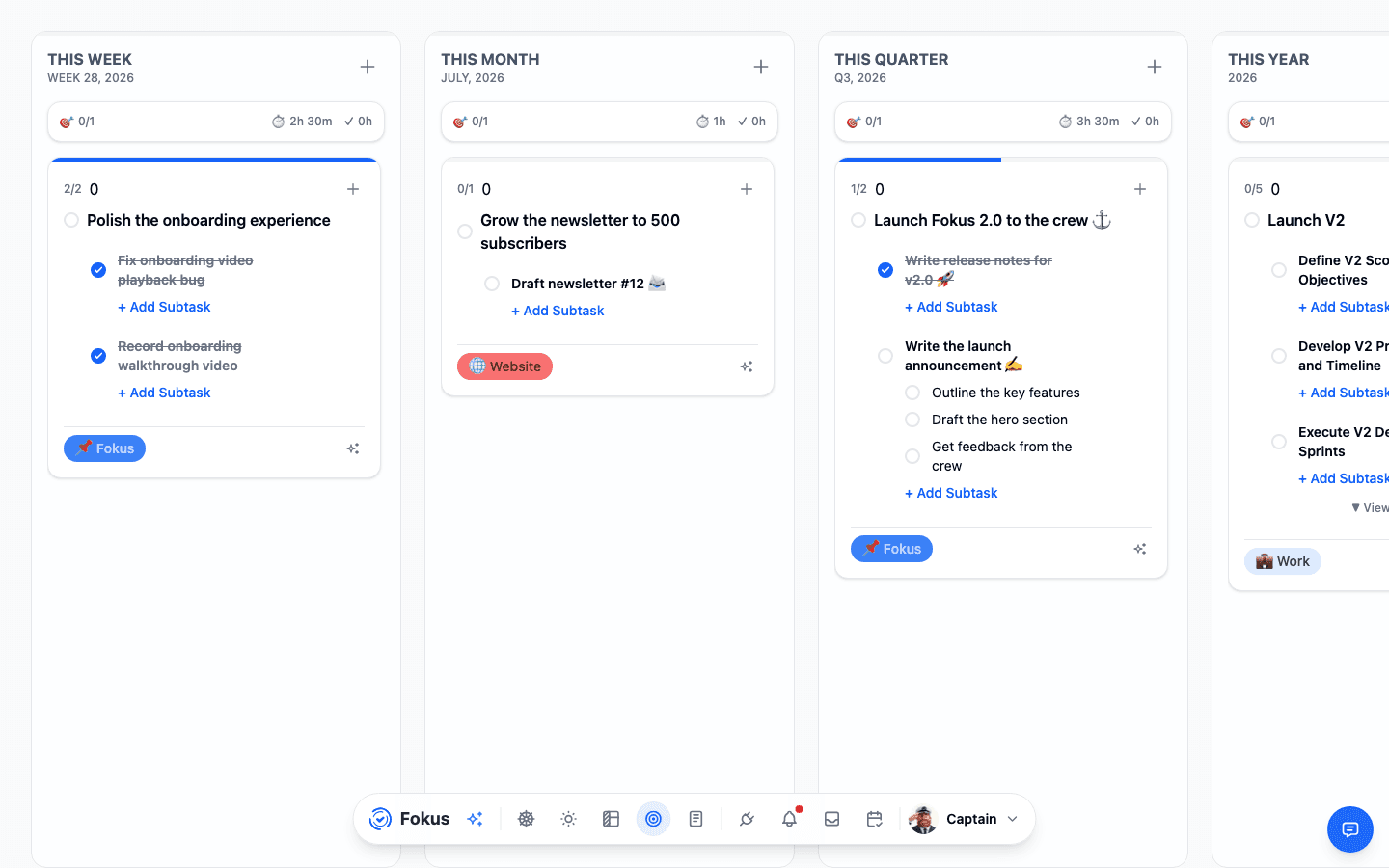
Objectives is the goal-planning view in Fokus. It organizes objectives by time horizon so you can review what matters now, what belongs to the current week or month, and what supports larger quarterly or yearly outcomes.
In the current layout, the top bar lets you switch between Current, Week, Month, Quarter, and Year, and also open History. The main page then shows separate sections such as THIS WEEK, THIS MONTH, THIS QUARTER, and THIS YEAR, each with progress totals, estimated and actual time, and either an empty state or expandable objective cards with linked tasks.
Best use of Objectives
Use Objectives when you want to connect day-to-day tasks to larger outcomes. It is the right surface when simple task lists are not enough and you need progress at a goal level.
How to Access It
- Open
Objectivesfrom the bottom navigation. - Use the horizon tabs at the top to change the time frame you want to review.
- Open
Historywhen you want to look back at previous objective periods.
What You Can Do Here
- Review objectives by time horizon instead of mixing all goals together.
- Add a new objective inside the active weekly, monthly, quarterly, or yearly section.
- See
Objectives Progress,Total Estimated Time, andTotal Actual Timefor each horizon. - Identify empty periods quickly through the built-in
No objectives yetstates. - Open objective cards that show progress, linked tasks, and related bucket labels.
- Add tasks directly to an objective.
- Edit an objective title or open task-level actions such as view, edit, or delete.
- Add subtasks under an objective and expand longer lists with
View more tasks. - Use
Generate tasks with AIwhen you want help turning an objective into concrete work.
Common Tasks
Choose the right horizon
Start by deciding whether the goal belongs to the current week, month, quarter, or year so it is tracked at the right level.
Add or review the objective
Use Add Objective in the relevant section, or open an existing objective card to review its current progress and linked tasks.
Break the goal into work
Add tasks or subtasks inside the objective so the goal becomes actionable instead of remaining a high-level intention.
Check time expectations
Compare estimated and actual time totals in each section to see whether the horizon is realistic or underplanned.
Use AI when the next steps are unclear
Trigger Generate tasks with AI if you need help expanding an objective into a stronger task list.
Important Behaviors
- Objectives are grouped by time horizon, which helps separate near-term execution from longer-term direction.
- Each horizon has its own progress and time summary, so you can judge both completion and effort.
- Empty states are part of the workflow, making it obvious where a planning layer has not been defined yet.
- Objective cards combine goal progress with task-level actions, which keeps strategy and execution connected in one place.
- AI task generation appears directly on the objective card, reinforcing the idea that objectives can be converted into concrete work from the same screen.
When to Use Objectives Instead of Planner Views
- Use Objectives when you are deciding what outcomes matter over a longer period.
- Use Kanban when the goal is already defined and you need to organize tasks by date.
- Use Calendar when tasks need exact time placement.
- Use Objectives first when planning from strategy downward, then move into Planner to schedule the resulting work.
Related Features
How is this guide?