Morning Briefing
An AI rundown of your day — schedule, rollovers, conflicts, and deadlines — before the day gets loud.
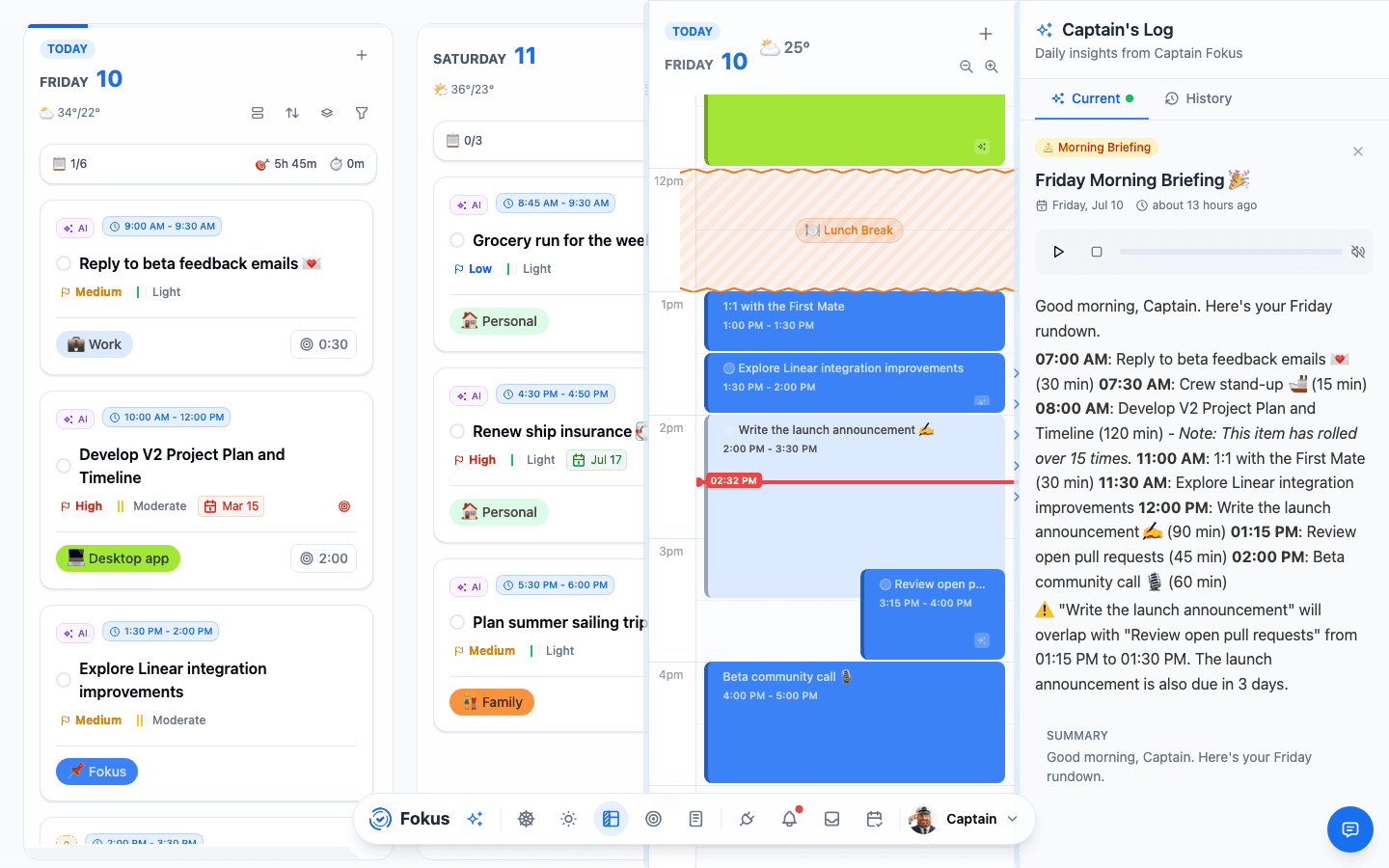
The Morning Briefing is Captain Fokus reading your day back to you: every meeting and scheduled task in order, what rolled over from yesterday, where the plan collides, and which deadlines are breathing down your neck. Read it with your first coffee and nothing surprises you before lunch.
How you get it
- Automatically — the briefing is written when your morning window closes (default 06:00–10:00), and the sparkles icon glows to tell you it's ready. Optionally it lands in your inbox too (notification settings).
- Manually — open AI Quick Actions (the sparkles in the Kanban/Calendar header) and hit Generate Briefing whenever you want a fresh one.
Why it arrives at the end of the window
The window is when you decide the day: it opens with Review your daily plan on Day View — and a nudge on your phone — so you can shape the day while there is still a day to shape. The briefing is written at the other end, once you've had that time, which is what lets it report the plan you committed to: the hours you booked, your seaworthiness score and your compass. A briefing written at 06:00 could only narrate what the scheduler guessed.
Plan first, read second. If you never open the plan, the briefing still arrives and still tells you what's ahead.
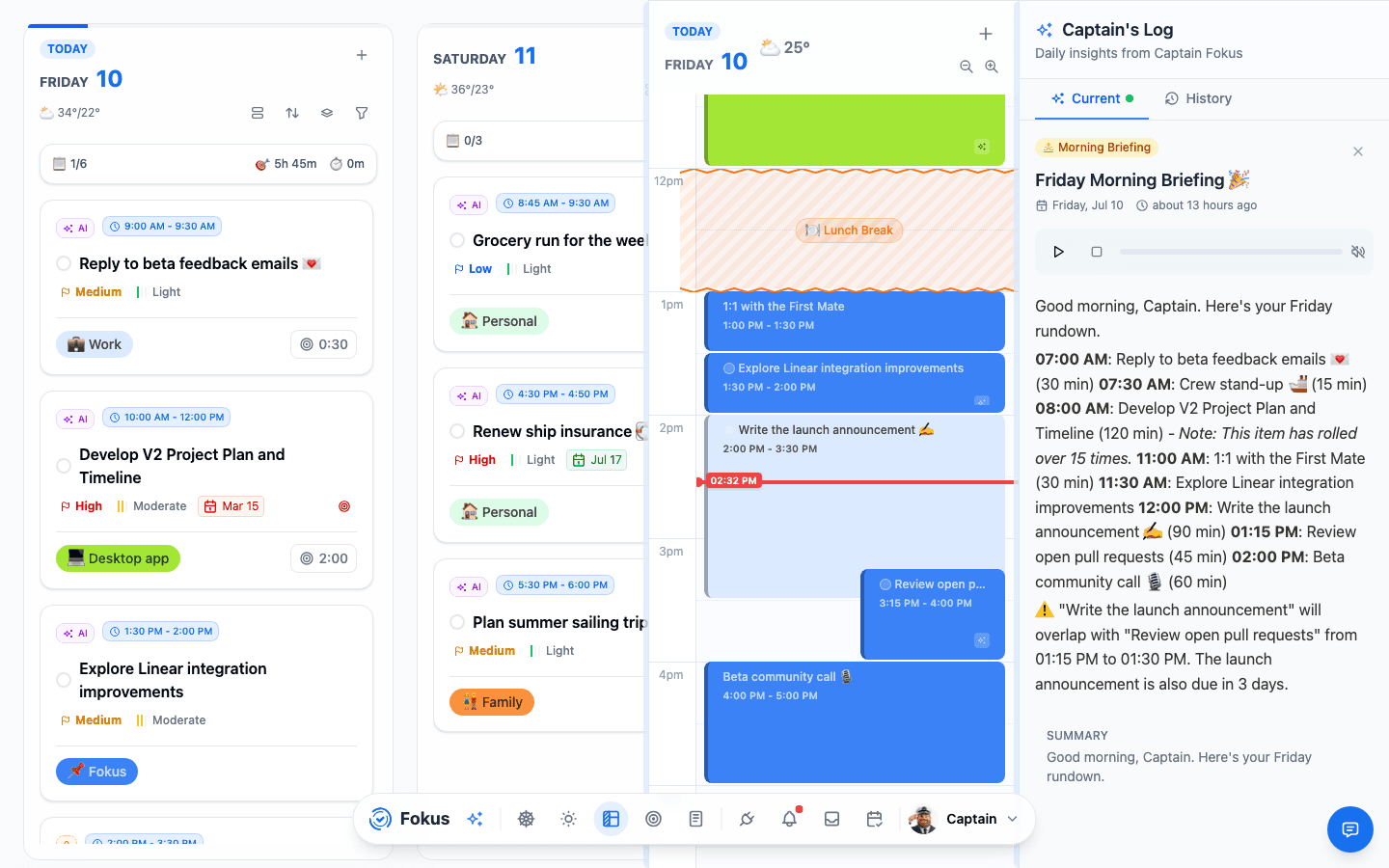
Every briefing is kept in the Captain's Log — press Ctrl+⇧+I or pick Captain's Log from Spotlight. Attention holds the feed of things needing your hand, Current shows today's report, and History keeps the archive; the enlarge button opens the same three views full-width on the Captain screen:
What's inside
Every briefing starts with the essentials, always on:
- Your schedule, hour by hour, with durations.
- Rollovers — carried-over tasks, called out honestly ("this item has rolled over 15 times" 👀).
- Conflicts — where two commitments overlap, spotted before they hurt.
- Deadlines — what's due soon, including things not scheduled today.
Then a short insight summary — and an audio player, so you can listen to your briefing while the coffee brews.
If you have email delivery on, the briefing email leads with that same write-up; your schedule and lists sit underneath it as detail. It also carries a Listen to your brief button that opens the report in Fokus and starts the narration.
Bring in your other tools
Your day doesn't live only in Fokus. Switch on any of these and Captain Fokus folds them into the same briefing — and, because they're part of the report, they show up in the email and get summarized in the audio too:
- 📧 Emails to handle — the messages your Email Assistant flagged as needs a reply or FYI, so your inbox triage is done before you open your inbox. Needs the Email Assistant add-on.
- 🔗 Assigned in your tools — open items assigned to you in GitHub, Jira, Linear, Asana and other connected task tools, grouped by tool and ordered by what's due first.
- 💬 Slack catch-up — the decisions, mentions and busy threads from your channels since yesterday evening. Needs Slack connected.
- 🎤 Standup & open PRs — what you closed, what's in progress and what's blocked, written first-person and ready to paste into standup. Needs GitHub, Jira, Linear or Asana connected.
- 🚨 Error triage — the top unresolved errors and regressions from the last 24 hours. Needs Sentry connected.
- 📰 Newsletter digest — a roundup of the newsletters that landed this week. Needs the Email Assistant add-on.
- 📅 Meeting prep — flags today's important meetings and, with the Meeting Scribe add-on, offers to prepare a briefing and record each one.
Live sources run just in time
The Slack, standup, error and newsletter sections are prepared by your AI crew. When you switch one on, Fokus sets up its digest to run shortly before your morning window — so what you read is fresh — and each one links to the full digest if you want the detail.
Share it with your team
Post your briefing to Slack or Microsoft Teams as a quick first-person standup — Captain Fokus drafts it, you pick the channel, and it posts as you. Open a brief and tap Share; the mobile walkthrough shows each step.
Make it yours
Open Settings → AI Agents and, under the Morning Briefing, use the Brief sections panel. For every section you can:
- Toggle it on or off.
- Drag to reorder — the order in the list is the order it appears in your briefing.
A section that needs something you haven't set up yet appears locked, with a hint naming exactly what to connect — an add-on or an integration. Connect it and the section unlocks. Your schedule, rollovers, conflicts and deadlines are always included and need no setup.
The time window sits in the same place; email delivery and quiet hours are under Settings → Notifications.
Pairs well with
Read the briefing, fix anything it flagged with one Optimize Schedule click — both live in the same popover. Ten seconds, planned day.
How is this guide?