Billing & Add-ons
Fokus is free during the public beta, with no credit card. What the plan, the trial, the add-ons and invoices look like once the beta ends.
Fokus is free during the public beta — the app and the add-ons, with no credit card. There's nothing to subscribe to today, and no date has been set for the end of the beta.
This page covers both sides: what you see while the beta runs, and how billing works once it ends — a single plan (Fokus Pro), optional add-ons, a free trial, and invoices.
During the public beta
While the beta runs, payments are switched off altogether. In practice:
- There's no Billing page. Settings has no Billing entry, nothing asks for a card, and nothing is charged.
- No trial decides whether you can use Fokus. The subscribe screen described further down only exists once payments are on. Until then it never appears — not on the web, not on desktop, not on your phone.
- Settings → Referrals is already there, with your invite link. It talks about trial days: 14 for a friend who joins through your link, and 7 more for you each time one of them verifies their email. If your account has trial days of its own — because you joined through a friend's link, say — the page also shows how many are left, and once they're used up it reads "Your trial has expired — earn more days by inviting friends." That line is about those days, not about the beta: no subscribe screen follows it, and your workspace isn't paused.
An add-on shows as locked?
Without a Billing page there's no switch for add-ons on your side. If one shows "This feature is an add-on and isn't enabled for this workspace yet.", it hasn't been enabled for your workspace — tell us which add-on you're missing through Support.
The free trial, once the beta ends
Once the beta ends and billing is switched on, a new account starts with a 7-day free trial of everything — Pro and all add-ons, no card required. You can stretch it further:
- Invite friends — each friend who signs up through your link and verifies their email adds +7 days (up to 8 rewards), and joining through a friend's link starts you with 14 days instead of 7.
- Add a card on file — a one-time +7 days, without being charged anything.
When the trial runs out, Fokus shows a subscribe screen and pauses the workspace until you're on Pro — your data is never touched; settings, billing, and referrals stay reachable the whole time. We'll email you two days before the trial ends, and once more when it's over.
Already here during the beta?
Thank you. When billing is switched on, accounts that already exist get a one-time 30-day trial of everything, so nobody who's been here through the beta meets the subscribe screen on day one.
Starting a subscription
Subscribing starts when the beta ends — until then there's no Billing page to do it from. From then on, billing lives at Settings → Billing (a locked add-on points you there too). It's where you subscribe to Fokus Pro, switch add-ons on and off, change your plan, and download your invoices.
Fokus is a single plan — Pro — plus optional add-ons you pay for only if you use them. Pick a billing cycle, tick the add-ons you want, tell us where to bill you, and subscribe.
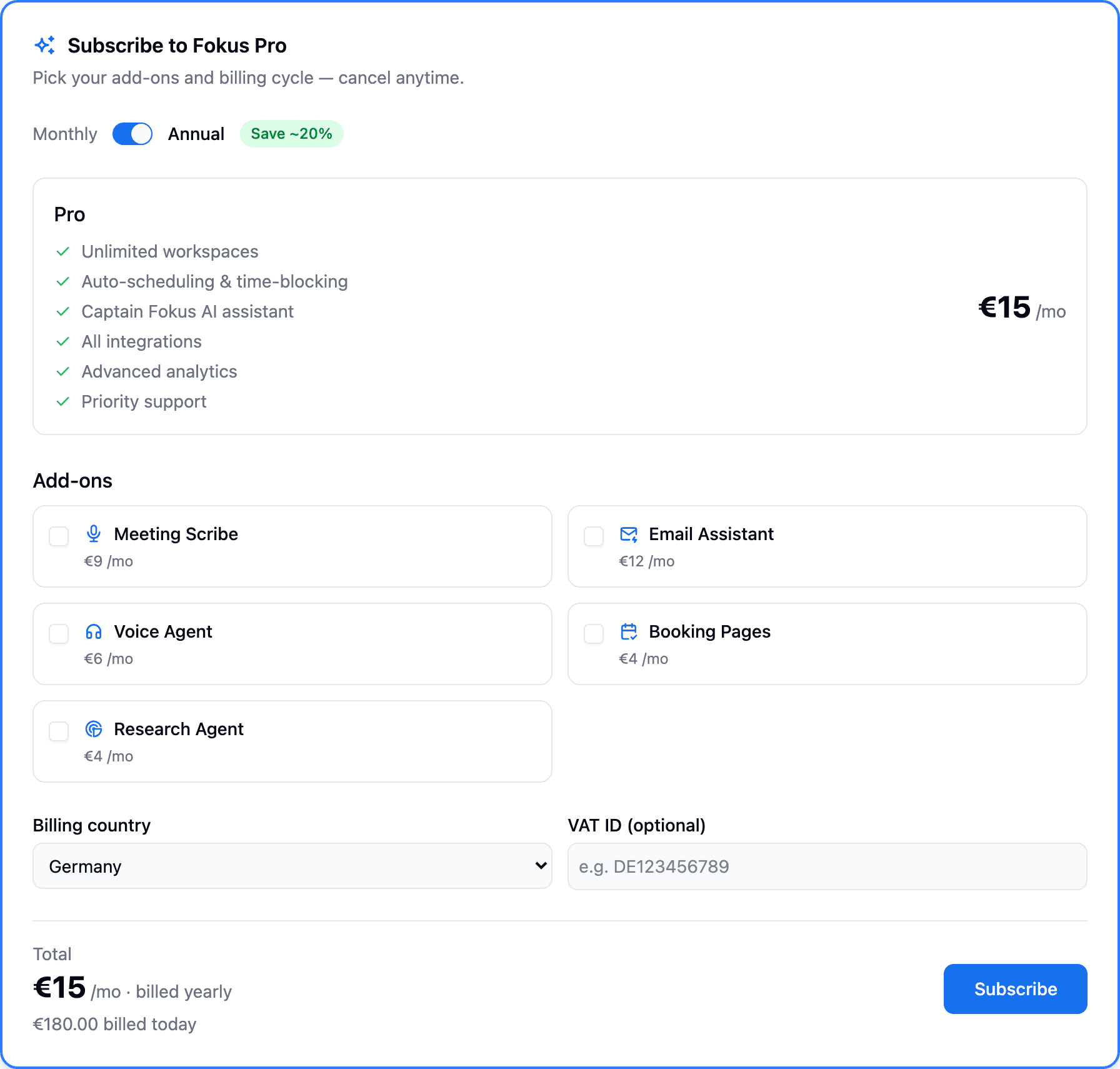
Choose monthly or annual
Annual bills once for the whole year at a discounted effective rate (~20% off). The toggle re-prices everything on the page instantly.
Add the agents you want
Every add-on shows its own price and adds to the running total. Tick as many as you like — you can change them anytime later, so there's no need to get it perfect now.
Set your billing country
Your country decides how tax appears on the invoice. If you're a business with an EU VAT ID, add it in the optional field — cross-border B2B sales are reverse-charged.
Subscribe
Confirm your card in the secure checkout. The billed today figure is exactly what's charged — for annual plans that's the full 12 months in one payment.
Your current plan
Once you're subscribed — which can only happen after the beta — the top of Settings → Billing becomes your plan summary: the price, your renewal date, and the add-ons you're on.
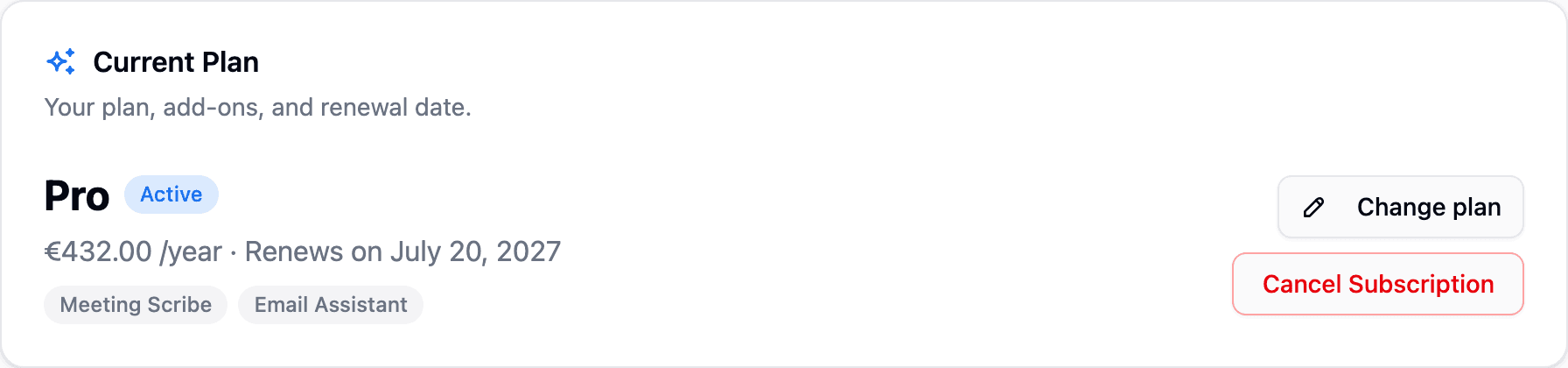
- Change plan opens the editor (below).
- Cancel Subscription stops it renewing — you keep Pro and all add-ons until the end of the period you've already paid for; they end together when it lapses. Changed your mind? A Resume button brings it straight back, any time before it lapses.
Changing your plan
With a subscription running — so, after the beta — you add or drop an add-on, or switch between monthly and annual, from the Change plan dialog.
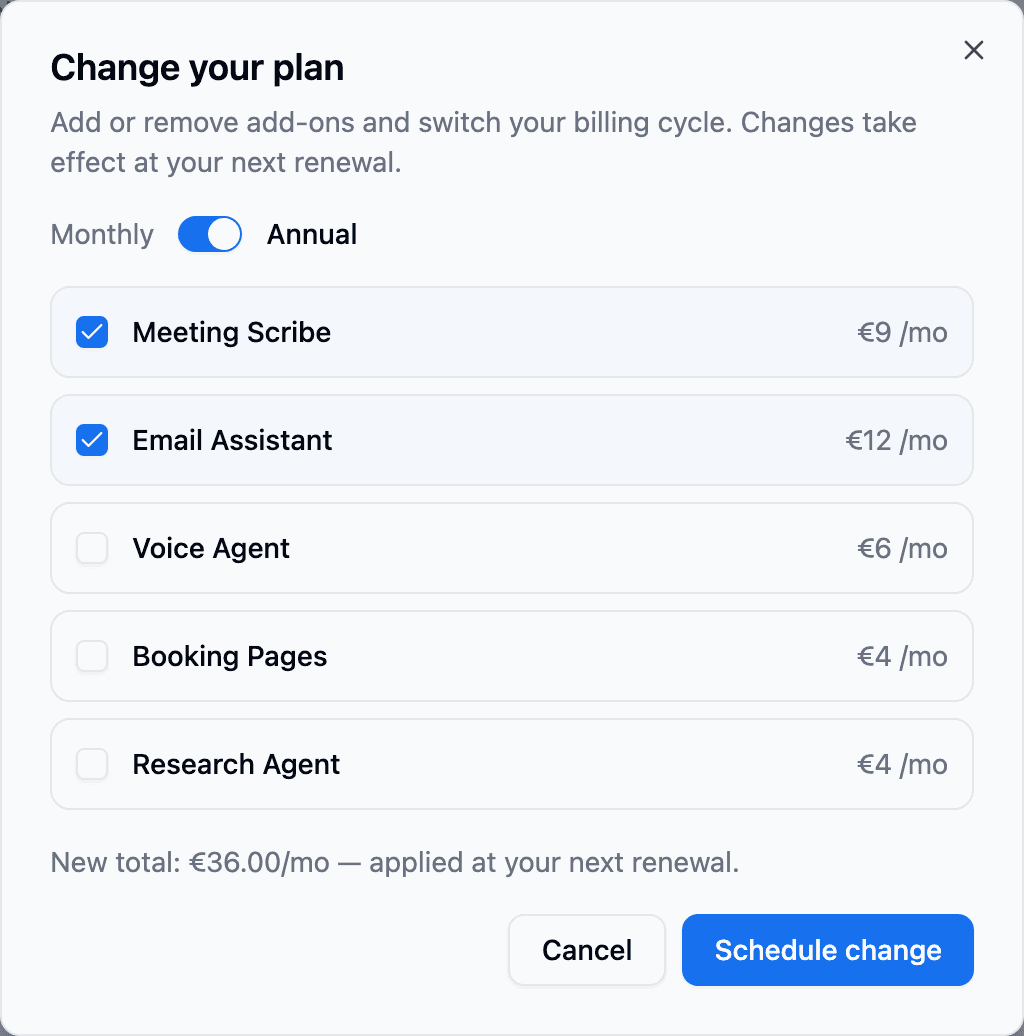
Additions are instant, removals wait for renewal
Adding an add-on activates it immediately — you pay a one-off, prorated amount covering just the rest of your current period (the dialog shows the exact figure before you confirm), and from the next renewal it's part of your regular price. Removing an add-on or switching between monthly and annual takes effect at your next renewal; the current period is never refunded. To swap the card used for renewals, just add a new one under Payment Method — future charges use your newest card automatically.
Add-ons
During the public beta the add-ons are free. Once it ends, they're optional agents you switch on per workspace in Settings → Billing, priced separately so you only pay for what you use:
- Meeting Scribe Agent (MSA) — bot-free meeting recording with transcripts, summaries, and action items.
- Email Assistant Agent (EAA) — inbox triage, drafted replies in your voice, and email-to-task automation.
- Voice Agent — talk to Captain Fokus out loud.
- Booking Pages — public scheduling links synced with your availability.
- Research Agent — scheduled research runs (competitor intel, job posts, deal signals) delivered as notes. Also doubles your daily Captain Fokus token budget.
Once billing is on, features unlock immediately — the Bookings icon appears in your dock the moment its add-on turns on.
Invoices & tax
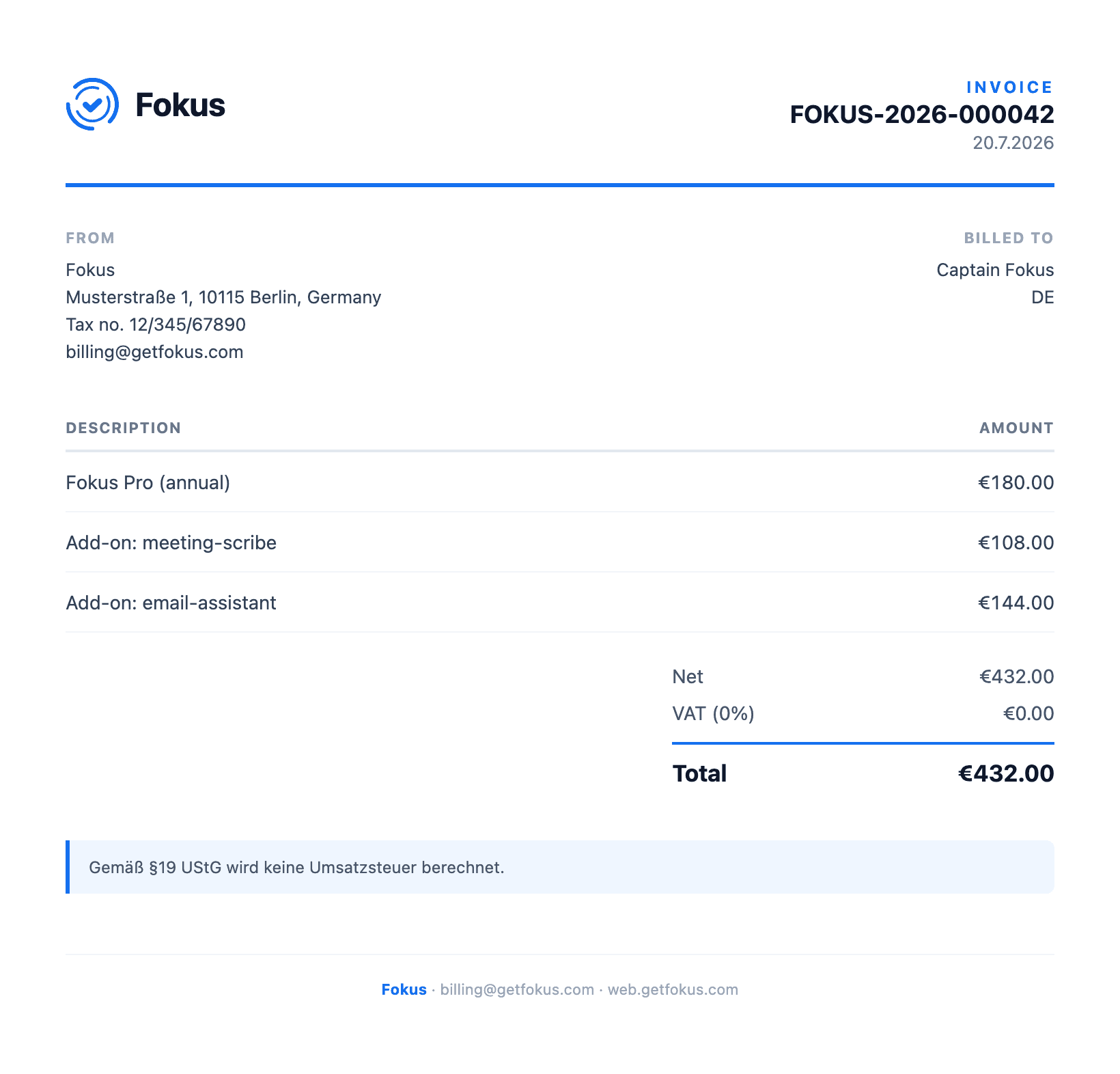
During the beta there are no payments, so there are no invoices yet. Once billing is on, every completed payment produces a numbered invoice you can download from Settings → Billing.
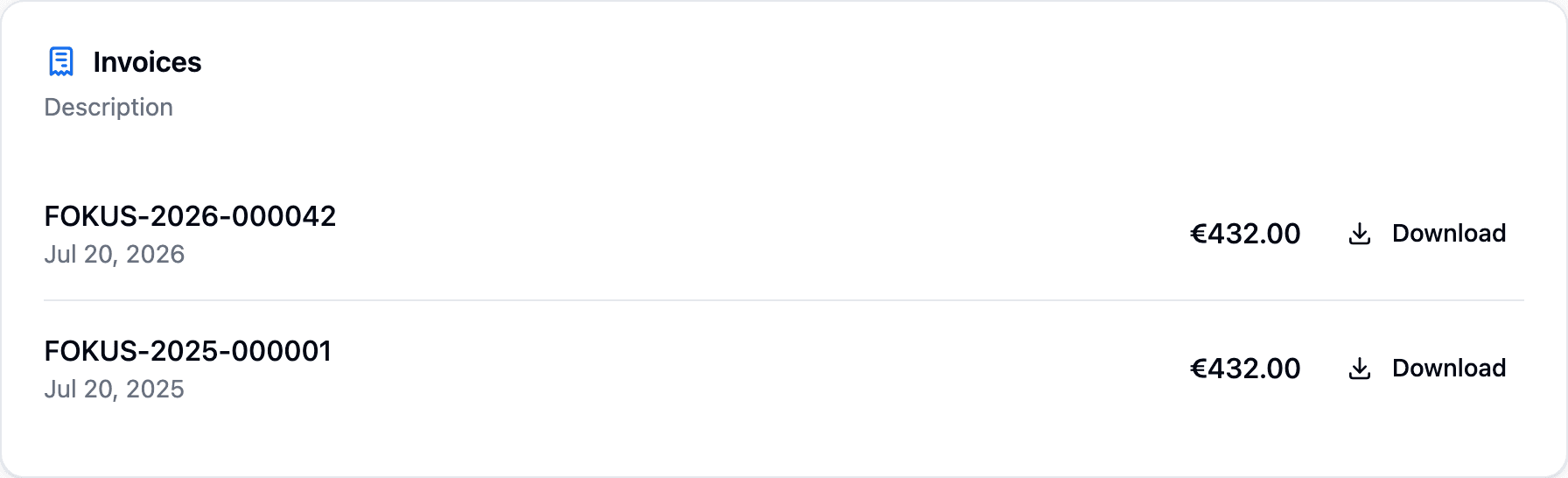
Each one is a proper receipt — seller and buyer details, a line for the plan and every add-on, and the tax treatment for your country.
How tax is handled
Prices are shown VAT-inclusive, and your billing country determines the rest: EU customers see the applicable VAT (or a reverse-charge note when a valid VAT ID is on file), and customers outside the EU aren't charged EU VAT at all. The invoice above is issued under the German small-business rule (§19 UStG), so no VAT is added.
How is this guide?