Buckets
Group tasks by bucket or category and review the work inside each area with time-based subgroups.
Overview
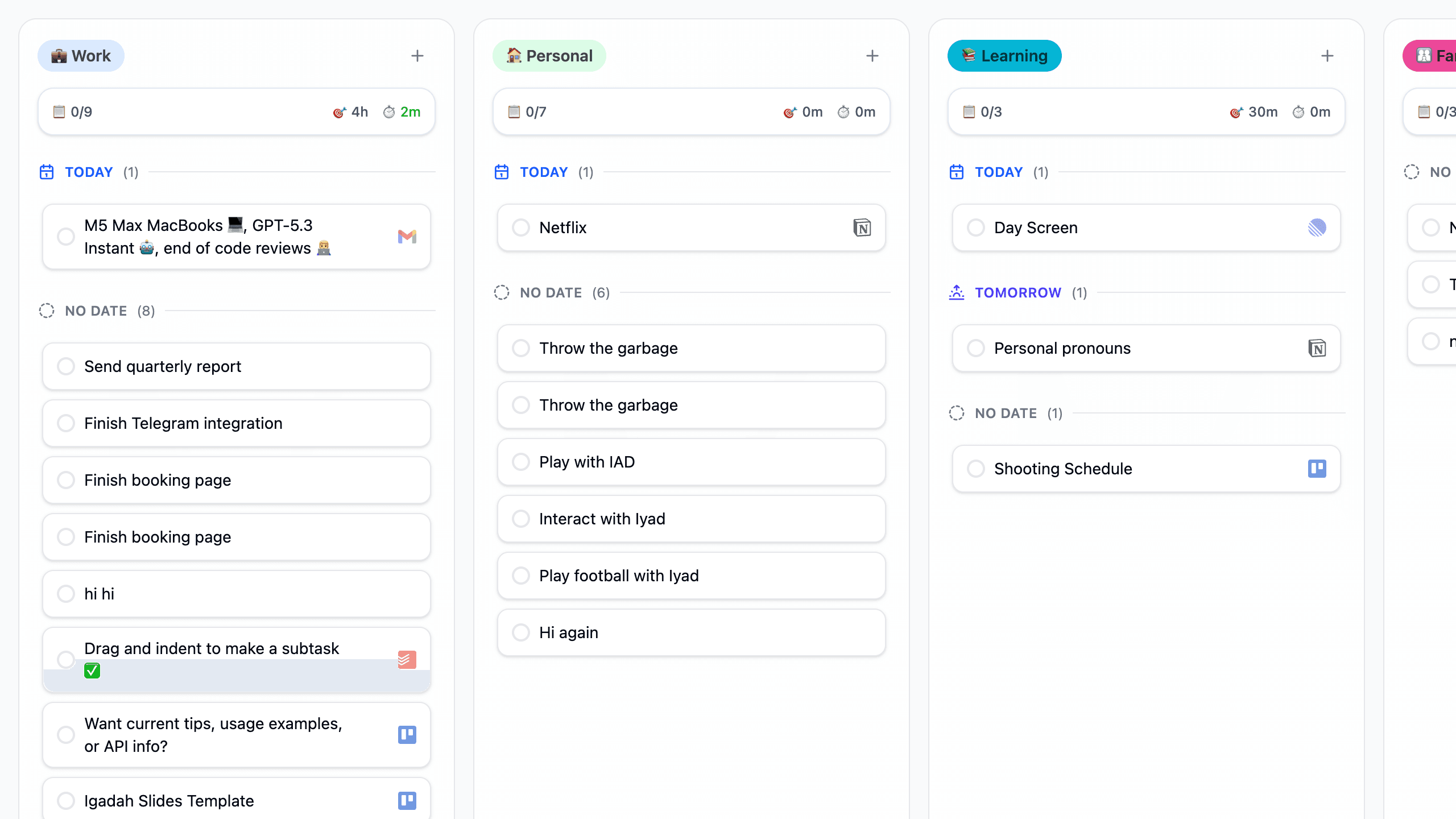
Buckets is a planner view that groups work by bucket instead of by date alone. Each bucket becomes its own column, and tasks inside that column can still be separated into time-oriented sections such as Today, Tomorrow, or No Date.
In the current layout, the top bar lets you move between Kanban, Buckets, Calendar, and Analytics, while the Buckets-specific controls include All Buckets, Grouping, View Mode, Filter, and Auto-hide. Below that, each bucket column shows task progress, estimated and actual time totals, and the tasks currently assigned to that bucket.
Best use of Buckets
Use Buckets when the category of work matters more than the date alone. It is the best view for reviewing projects, life areas, or focus domains without losing visibility into when tasks are due.
How to Access It
- Open the
Plannermenu from the bottom navigation. - Select
Buckets. - Use this view when you want to review work by category instead of only by date.
What You Can Do Here
- Review tasks grouped into bucket columns such as work, personal, learning, family, or other custom buckets.
- See per-bucket summaries for
Tasks Progress,Total Estimated Time, andTotal Actual Time. - Add a task directly from a bucket column.
- Review time-based subgroups inside each bucket, such as
Today,Tomorrow, andNo Date. - Start a timer directly from a task card.
- See source badges on tasks imported from connected tools such as Gmail, Trello, Todoist, Notion, or Linear.
- Use
All Bucketsto control which bucket columns are visible. - Adjust
Grouping,View Mode, andFilterto change how the board is displayed. - Use
Auto-hideif you want the header to take less space while working.
Common Tasks
Scan the buckets first
Start at the column headers to understand which areas of life or work currently carry the most tasks and time.
Review the work inside each category
Use the grouped sections inside a bucket, such as Today or No Date, to see whether the work is actionable now or still unscheduled.
Add or start work from the same screen
Use Add Task for the relevant bucket or start a timer directly from an existing task card when you are ready to execute.
Narrow the board if it becomes noisy
Open All Buckets or Filter when you want to focus on only a subset of categories or task types.
Switch views when the planning question changes
Move back to Kanban when date-based organization matters more, or switch to Calendar when you need exact time placement.
Important Behaviors
- Buckets keeps category structure visible at all times, which makes it easier to spot imbalance between domains such as work and personal life.
- Tasks remain grouped by time inside each bucket, so the view still preserves near-term urgency.
- Bucket-level time totals help you estimate how much effort a category is consuming.
- Source badges make it clear when work is coming from external systems rather than being created directly in Fokus.
- Display controls such as grouping, view mode, hidden buckets, and filters make this view more configurable than a simple static board.
When to Use Buckets Instead of Kanban or Calendar
- Use Buckets when you want to organize work by category, project, or life area.
- Use Kanban when you want the primary grouping to be date.
- Use Calendar when you need to see work on an hourly schedule.
- Use Buckets when you are balancing different domains of work before committing them into a more precise schedule.
Related Features
How is this guide?